
Dictionaryによる属性リストの横展開(可変列方式)
※ 保有属性を右方向に連番列として展開する形式
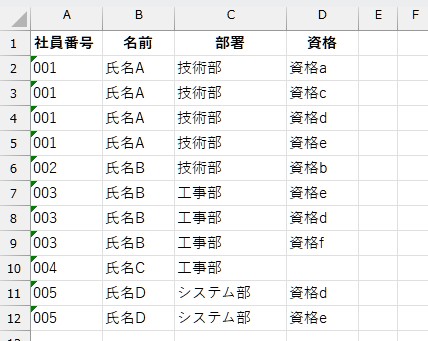
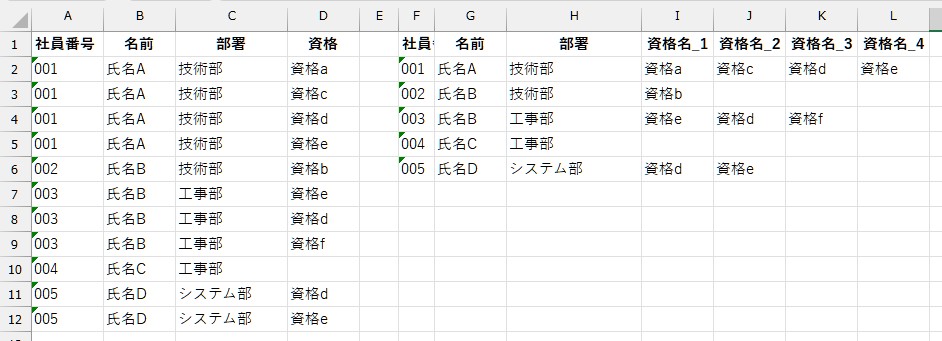
VB
Option Explicit

Sub CreateEmployeeQualificationList()

    Dim ws As Worksheet
    Set ws = ThisWorkbook.Worksheets("Sheet5")

    Dim dictEmp As Object          '社員ごとの辞書
    Dim dictLic As Object          '資格辞書
    Set dictEmp = CreateObject("Scripting.Dictionary")
    dictEmp.CompareMode = vbTextCompare '文字列比較

    Dim lastRow As Long
    Dim dataArray As Variant
    Dim i As Long

    With ws
        lastRow = .Cells(.Rows.Count, "A").End(xlUp).row

        ' 出力列クリア&見出し
        .Range("F:M").ClearContents
        .Range("F1").Value = "社員番号"
        .Range("G1").Value = "名前"
        .Range("H1").Value = "部署"

        If lastRow < 2 Then Exit Sub

        ' 入力配列化
        dataArray = .Range("A2:D" & lastRow).Value
    End With

    Dim empNo As String, empName As String, empDept As String, lic As String

    ' --- 集計処理 ---
    For i = 1 To UBound(dataArray, 1)

        empNo = Trim(dataArray(i, 1))
        empName = Trim(dataArray(i, 2))
        empDept = Trim(dataArray(i, 3))
        lic = Trim(dataArray(i, 4))

        If Len(empNo) > 0 Then

            ' 初回の社員登録
            If Not dictEmp.Exists(empNo) Then
                Set dictLic = CreateObject("Scripting.Dictionary")
                dictLic.CompareMode = vbTextCompare
                dictEmp.Add empNo, Array(empName, empDept, dictLic)
            End If

            ' 中身の参照
            empName = dictEmp(empNo)(0)
            empDept = dictEmp(empNo)(1)
            Set dictLic = dictEmp(empNo)(2)

            ' 資格(重複排除)
            If Len(lic) > 0 Then
                If Not dictLic.Exists(lic) Then
                    dictLic.Add lic, True
                End If
            End If
        End If
    Next i

    ' --- 社員番号(文字列)でソート ---
    Dim keys As Variant, sorted As Variant
    keys = dictEmp.keys
    sorted = SortStringArray(keys) '後述の関数でソート

    ' --- 出力作成 ---
    Dim result() As Variant
    Dim r As Long: r = 1
    Dim col As Long, maxLicCount As Long, licKey As Variant

    ' 一旦最大列をざっくり確保
    ReDim result(1 To dictEmp.Count, 1 To 100)

    Dim emp As Variant, empInfo As Variant

    For Each emp In sorted

        empInfo = dictEmp(emp)
        Set dictLic = empInfo(2)

        result(r, 1) = emp
        result(r, 2) = empInfo(0)
        result(r, 3) = empInfo(1)

        col = 4
        For Each licKey In dictLic.keys
            result(r, col) = licKey
            col = col + 1
        Next licKey

        ' 最大列数を記録
        If col - 4 > maxLicCount Then maxLicCount = col - 4

        r = r + 1
    Next emp

    ' 動的サイズに縮めて書き戻し
    ws.Range("F2").Resize(dictEmp.Count, 3 + maxLicCount).Value = result

    ' --- 資格列の見出し作成 ---
    Dim iCol As Long
    For iCol = 1 To maxLicCount
        ws.Cells(1, 9 + iCol - 1).Value = "資格名_" & iCol
    Next iCol

    MsgBox "社員資格一覧が完成しました!", vbInformation

End Sub

' ----▼簡易文字列ソート関数(昇順)---------
Private Function SortStringArray(arr As Variant) As Variant
    Dim i As Long, j As Long
    Dim temp As String
    For i = LBound(arr) To UBound(arr) - 1
        For j = i + 1 To UBound(arr)
            If arr(i) > arr(j) Then
                temp = arr(i)
                arr(i) = arr(j)
                arr(j) = temp
            End If
        Next j
    Next i
    SortStringArray = arr
End FunctionDictionaryによる属性フラグの横展開(マトリックス化方式)
※ 各属性の有無を 〇/空欄(Boolean)で表す形式
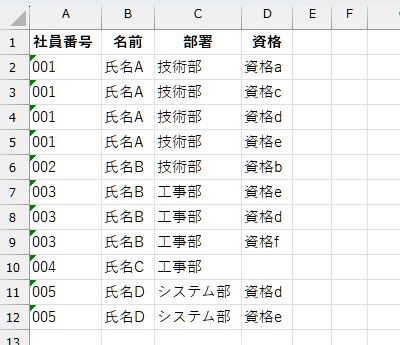
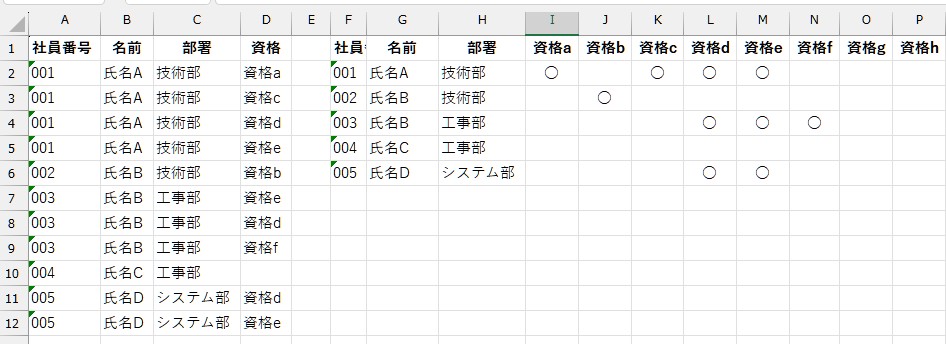
Sub CreateEmployeeLicenseMatrix()

    Dim wsData As Worksheet
    Dim wsLic As Worksheet
    Set wsData = ThisWorkbook.Worksheets("Sheet6")        '元データ
    Set wsLic = ThisWorkbook.Worksheets("資格名一覧")      '資格マスタ

    Dim dictEmp As Object, dictLic As Object
    Set dictEmp = CreateObject("Scripting.Dictionary")
    dictEmp.CompareMode = vbTextCompare

    Dim lastRow As Long, maxLic As Long
    Dim dataArray As Variant, licListArray As Variant
    Dim i As Long

    ' ================================
    ' ■資格マスタ取得
    ' ================================
    With wsLic
        maxLic = .Cells(.Rows.Count, "A").End(xlUp).row
        licListArray = .Range("A1:A" & maxLic).Value  '縦方向配列(1始まり)
    End With

    ' ================================
    ' ■元データ取得
    ' ================================
    With wsData
        lastRow = .Cells(.Rows.Count, "A").End(xlUp).row

        ' F以降クリア
        .Range("F:Z").ClearContents

        If lastRow < 2 Then Exit Sub

        dataArray = .Range("A2:D" & lastRow).Value
    End With

    Dim empNo As String, empName As String, empDept As String, lic As String

    ' ================================
    ' ■社員情報 × 資格Dictionary作成
    ' ================================
    For i = 1 To UBound(dataArray, 1)

        empNo = Trim(dataArray(i, 1))  '文字列3桁社員番号
        empName = Trim(dataArray(i, 2))
        empDept = Trim(dataArray(i, 3))
        lic = Trim(dataArray(i, 4))

        If Len(empNo) > 0 Then

            ' 新規社員登録
            If Not dictEmp.Exists(empNo) Then
                Set dictLic = CreateObject("Scripting.Dictionary")
                dictLic.CompareMode = vbTextCompare
                dictEmp.Add empNo, Array(empName, empDept, dictLic)
            End If

            Set dictLic = dictEmp(empNo)(2)

            ' 資格重複排除
            If Len(lic) > 0 Then
                If Not dictLic.Exists(lic) Then
                    dictLic.Add lic, True
                End If
            End If

        End If
    Next i

    ' ================================
    ' ■社員番号ソート(文字列昇順)
    ' ================================
    Dim arrKeys As Variant
    arrKeys = dictEmp.keys
    arrKeys = SortStringArray(arrKeys) '※後述

    ' ================================
    ' ■結果出力用配列作成
    ' ================================
    Dim result() As Variant
    Dim r As Long: r = 1
    Dim c As Long, e As Variant

    ReDim result(1 To dictEmp.Count, 1 To maxLic + 3)

    For Each e In arrKeys

        result(r, 1) = e
        result(r, 2) = dictEmp(e)(0)
        result(r, 3) = dictEmp(e)(1)

        Set dictLic = dictEmp(e)(2)

        For c = 1 To maxLic
            If dictLic.Exists(licListArray(c, 1)) Then
                result(r, c + 3) = "○"
            End If
        Next c

        r = r + 1
    Next e

    ' ================================
    ' ■シート出力(見出し付き)
    ' ================================
    Dim ws As Worksheet
    Set ws = wsData '直接出力する位置

    ws.Range("F1").Value = "社員番号"
    ws.Range("G1").Value = "名前"
    ws.Range("H1").Value = "部署"

    For c = 1 To maxLic
        ws.Cells(1, 8 + c).Value = licListArray(c, 1) 'I列?
    Next c

    ws.Range("F2").Resize(dictEmp.Count, maxLic + 3).Value = result

    MsgBox "資格マトリクス表が完成しました!", vbInformation

End Sub

'---▼文字列配列昇順ソート関数▼---
Private Function SortStringArray(arr As Variant) As Variant
    Dim i As Long, j As Long
    Dim tmp As String
    For i = LBound(arr) To UBound(arr) - 1
        For j = i + 1 To UBound(arr)
            If arr(i) > arr(j) Then
                tmp = arr(i): arr(i) = arr(j): arr(j) = tmp
            End If
        Next j
    Next i
    SortStringArray = arr
End Function
Dictionaryによる属性フラグの横展開(マトリックス化方式)2
※ データの更新「〇」のみを出力
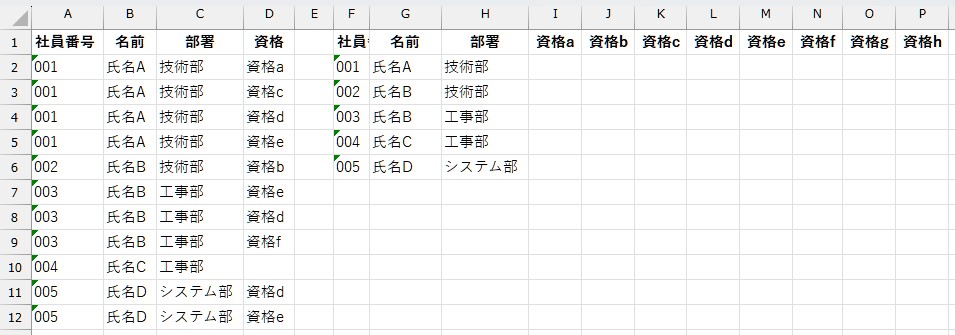

Option Explicit

Sub UpdateEmployeeLicenseMatrix()

    Dim wsData As Worksheet
    Dim wsLic As Worksheet
    Set wsData = ThisWorkbook.Worksheets("Sheet6")
    Set wsLic = ThisWorkbook.Sheets("資格名一覧")

    ' ---------------------------
    ' ■資格マスタ取得(縦方向A列)
    ' ---------------------------
    Dim maxLic As Long
    Dim licList As Variant
    maxLic = wsLic.Cells(wsLic.Rows.Count, "A").End(xlUp).row
    licList = wsLic.Range("A1:A" & maxLic).Value

    ' ---------------------------
    ' ■元資格データ取得(A:D)
    ' ---------------------------
    Dim lastRow As Long
    lastRow = wsData.Cells(wsData.Rows.Count, "A").End(xlUp).row
    If lastRow < 2 Then Exit Sub

    Dim data As Variant
    data = wsData.Range("A2:D" & lastRow).Value

    ' ---------------------------
    ' ■資格情報集計
    '   empNo → 資格Dictionary
    ' ---------------------------
    Dim dictEmp As Object, dictLic As Object
    Set dictEmp = CreateObject("Scripting.Dictionary")
    dictEmp.CompareMode = vbTextCompare

    Dim i As Long
    Dim empNo As String, lic As String

    For i = 1 To UBound(data, 1)

        empNo = Trim(data(i, 1))
        lic = Trim(data(i, 4))

        If Len(empNo) > 0 And Len(lic) > 0 Then

            If Not dictEmp.Exists(empNo) Then
                Set dictLic = CreateObject("Scripting.Dictionary")
                dictLic.CompareMode = vbTextCompare
                dictEmp.Add empNo, dictLic
            End If

            Set dictLic = dictEmp(empNo)

            If Not dictLic.Exists(lic) Then
                dictLic.Add lic, True
            End If

        End If
    Next i

    ' ---------------------------
    ' ■資格列クリア(I列以降)
    ' ---------------------------
    wsData.Range("I2:ZZ" & wsData.Rows.Count).ClearContents

    ' ---------------------------
    ' ■資格ヘッダ設定(I1~)
    ' ---------------------------
    Dim c As Long
    For c = 1 To maxLic
        wsData.Cells(1, 8 + c).Value = licList(c, 1) 'I列開始
    Next c

    ' ---------------------------
    ' ■社員一覧(F2~)に対して○反映
    ' ---------------------------
    Dim lastEmp As Long
    lastEmp = wsData.Cells(wsData.Rows.Count, "F").End(xlUp).row

    For i = 2 To lastEmp

        empNo = Trim(wsData.Cells(i, "F").Value)

        If Len(empNo) > 0 Then

            If dictEmp.Exists(empNo) Then
                Set dictLic = dictEmp(empNo)

                For c = 1 To maxLic
                    If dictLic.Exists(licList(c, 1)) Then
                        wsData.Cells(i, 8 + c).Value = "○"  '資格位置へ
                    End If
                Next c
            End If

        End If
    Next i

    MsgBox "資格マトリクスを最新情報に更新しました!", vbInformation

End Sub
コメント